 lbjoseph
Jul 11, 2011
lbjoseph
Jul 11, 2011
gx Graphics Library Center -  lbjoseph
The gx Graphics Library, or gxGL, is a 2D memory drawing library based off of the Win32 GDI libraries. Table of Contents
The functionality offered by gxGL allows you to draw in memory almost exactly as you would in a Liberty BASIC graphicbox. The commands are slightly different, but allow for more functionality.
Below you will find documentation for gxGL.
Getting gxGL
gxGL code page and usage instructions.Setting Up gxGL
It's easy to get started using gxGL. First, you'll have to put the header structures and variables at the top of your program. These are used by gxGL to keep track of your memory drawings.After that, all you need to do is tell gxGL how big of a canvas you want to draw on.
Call gx.InitMemoryDrawing CanvasWidth, CanvasHeightThis tells gxGL to allocate the properly sized surface available so you can begin drawing on it.
Closing gxGL
When your program ends, you need to tell gxGL to clean up after itself. This too is very simple:Call gx.FinishOnce you do this, gxGL deletes all the memory drawings and closes the handles to the resources it needs.
Colors
Colors in gxGL are exactly like the colors in Liberty BASIC commands. You can use one of the 16 colors recognized by LB, or any color in a "R G B" string format. You can even use the "buttonface" color.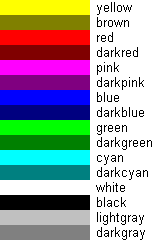
Graphics Concepts
Commands are issued to gxGL with a simple subroutine call:Call gx.Draw "cls; fill blue"Commands are separated by a semi-colon, and you can put as many commands in a string as you like. Commands are case-insensitive, which means it doesn't matter if they're uppercase or lowercase.
The Pen
The "pen" in gxGL is used to draw the outlines of shapes. In gxGL, the pen has a lot of options. The pen has three properties: width, style, and color.| PENWIDTH widthPx | Sets the width of the pen in pixels to be the following number. |
| PENCOLOR color | Sets the color to be the color name specified or the following "R G B" string. |
| PENSTYLE styleName | Sets the style of the pen to be one of the styles listed in the following table. |
| normal | The default setting. This is a solid pen. |
| solid | Same as normal. |
| none | The pen is invisible. |
| insideframe | This is a solid pen that stays within the boundaries of the shape drawn. |
| dash | This is a dashed pen. |
| dot | This is a dotted pen. |
| dashdot | This pen follows a dash-dot pattern. |
| dashdotdot | This pen follows a dash-dot-dot pattern. |
The following pen styles only work when the PENWIDTH is 1 px: dash , dot , dashdot , and dashdotdot .